

Wi-Fi Access and Login Guide
Get help with setting up Wi-Fi, troubleshooting login issues, and managing your University account access.
Follow the steps below to connect your device to eduroam, the University’s secure Wi-Fi network.
What is eduroam?
eduroam (Education Roaming) is a global Wi-Fi service providing secure internet access for students and staff at participating institutions. As a University of Greater Manchester user, you can connect to eduroam on campus and at thousands of locations worldwide using your university login credentials.
- Secure and encrypted network connection
- Available on most devices
- Accessible worldwide at participating universities
- Easy to set up using your University of Greater Manchester credentials or the eduroam Configuration Assistant Tool
Quick Steps to Automatically Configure eduroam
To automatically configure eduroam, visit the eduroam Configuration Assistant Tool webpage on your mobile device:
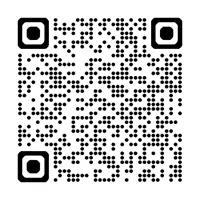
- eduroam Configuration Assistant Tool or scan the QR code below
- Select 'Click here to download your eduroam installer'
- Select 'University of Greater Manchester' from the list of organisations
- Download the installer and follow the setup instructions.
Scan the QR Code to Visit the eduroam Configuration Assistant Tool Webpage
Manual Configuration - Device Specific Guides
You can follow the specific steps below for your device to manually configure and connect:
Windows
iPad/iPhone
Mac OS
Android
UGM Help Guides
- UGM Wireless Access iPhone (opens in new tab)pdf file[270KB]
- UGM Wireless Access Android (opens in new tab)pdf file[314KB]